Hexo-设置(一)

Hexo设置“阅读全文”,文章代码“高亮”配置,文章代码开启“copy”设置

Hexo的主页会显示md文章的全文,影响阅读及展示效果,3种方法设置“阅读全文”按钮,收缩主页上的文章

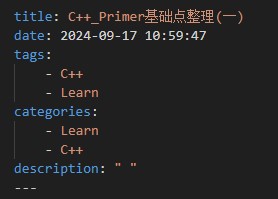
1. Markdown文件的front-matter设置

也就是每篇Markdown文章顶部用虚线隔出来的front-matter 部分加上

1
description: " "

分号后有一个空格、引号下有一个空格

Next主题为例

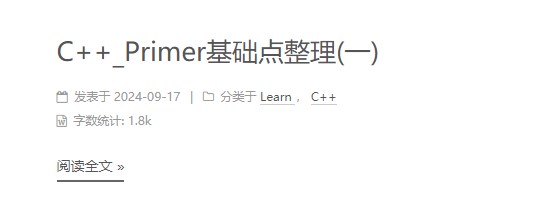
效果如下:

Next主题为例

2. Markdown中的注释

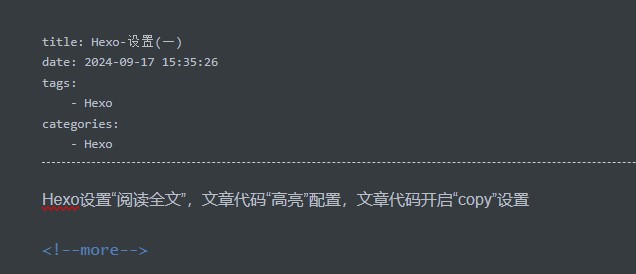
在Markdown文章中,在想要被展示在首页中的内容后加上

1
<!--more-->

如图所示:

Next主题为例

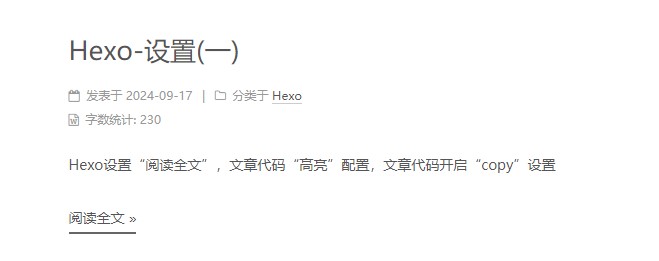
效果如下:
Next主题为例

3. 主题配置(不推荐)

在主题文件夹下的**_config.yml文件中利用快捷键Ctrl+F**找auto关键字

Next主题为例
enable选项设置为true
length:默认截取长度,展开前展示多少字符
不推荐此方法,有帖子说这个设置会导致Markdown语法失效(未经本人验证)

Hexo设置代码高亮

以next主题为例,在thems文件加下的_config.yml文件找到此设置
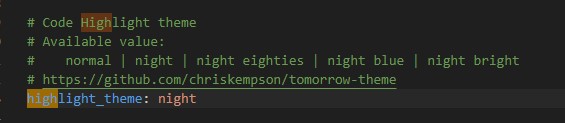
Next主题为例
Next主题支持 normal | night | night eighties | night blue | night bright 五种代码高亮方式,根据个人喜好进行配置即可

Hexo设置代码一键“Copy”

Next主题V6以上的版本,可直接在主题的_config.yml文件下一键打开
本文Next v5.1.4

1. 修改 _layout.swig 文件

进入 hexo / themes / next / layout 目录下

_layout.swig 文件夹中添加下列代码中*/body*标签上方的一句(没有+,通常位于此文件的最后):

1
2
3
4
5
6
7
8
9
  </div>
...
{% include '_third-party/scroll-cookie.swig' %}
{% include '_third-party/exturl.swig' %}
...
+ {% include '_third-party/copy-code.swig' %}
</body>
</html>

2. 创建 copy-code.swig 文件

进入 hexo / themes / next / layout / _third-party 目录下

创建一个名为:copy-code.swig 的文件,并添加以下内容:

1
2
3
4
5
6
7
8
9
10
11
12
13
14
15
16
17
18
19
20
21
22
23
24
25
26
27
28
29
30
31
32
33
34
35
36
37
38
39
40
41
42
43
44
45
46
47
48
49
50
51
52
53
54
55
56
57
58
59
60
61
62
63
64
65
66
67
68
69
70
71
72
{% if theme.codeblock.copy_button.enable %}
<style>
.copy-btn {
display: inline-block;
padding: 6px 12px;
font-size: 13px;
font-weight: 700;
line-height: 20px;
color: #333;
white-space: nowrap;
vertical-align: middle;
cursor: pointer;
background-color: #eee;
background-image: linear-gradient(#fcfcfc, #eee);
border: 1px solid #d5d5d5;
border-radius: 3px;
user-select: none;
outline: 0;
}

.highlight-wrap .copy-btn {
transition: opacity .3s ease-in-out;
opacity: 0;
padding: 2px 6px;
position: absolute;
right: 4px;
top: 8px;
}

.highlight-wrap:hover .copy-btn,
.highlight-wrap .copy-btn:focus {
opacity: 1
}

.highlight-wrap {
position: relative;
}
</style>

<script>
$('.highlight').each(function (i, e) {
var $wrap = $('<div>').addClass('highlight-wrap')
$(e).after($wrap)
$wrap.append($('<button>').addClass('copy-btn').append('{{__("post.copy_button")}}').on('click', function (e) {
var code = $(this).parent().find('.code').find('.line').map(function (i, e) {
return $(e).text()
}).toArray().join('/n')
var ta = document.createElement('textarea')
document.body.appendChild(ta)
ta.style.position = 'absolute'
ta.style.top = '0px'
ta.style.left = '0px'
ta.value = code
ta.select()
ta.focus()
var result = document.execCommand('copy')
document.body.removeChild(ta)
{% if theme.codeblock.copy_button.show_result %}
if(result)$(this).text('{{__("post.copy_success")}}')
else $(this).text('{{__("post.copy_failure")}}')
{% endif %}
$(this).blur()
})).on('mouseleave', function (e) {
var $b = $(this).find('.copy-btn')
setTimeout(function () {
$b.text('{{__("post.copy_button")}}')
}, 300)
}).append(e)
})
</script>
{% endif %}

3. 添加提示语言

假设已经更改Hexo主题为汉语

打开 ** / themes / next / languages / zh-Hans.yml** 文件,在 post 下添加:

1
2
3
copy_button: 复制
copy_success: 复制成功
copy_failure: 复制失败

只有next v5的版本,汉语的 yml 文件的名字才是 zh-Hans!

每一行最前面都有两个空格,要与下面默认的设置对齐,不要使用 tab ,以免出现不必要的错误

4. 添加开关

hexo / themes / next / _config.yml 文件夹中添加以下内容:

1
2
3
4
5
6
# Add copy button on codeblock
codeblock:
copy_button:
enable: true
# Show text copy result
show_result: true

来源: 雨园博客